Xtracto

In closed testing

Your spending records itself.
And never leaves your phone.

When your bank notifies a card payment or a direct debit, Xtracto reads that alert and turns it into a movement. Nothing to type, no bank to connect, no credentials handed to anyone.

Join the closed test See if your bank is there

Why you can trust it

Almost every expense app asks you to trust its privacy promise. Xtracto does not ask you to trust it: it declares no internet permission. That is not a policy, it is a technical limitation you can verify yourself on the file that gets installed:

$ aapt2 dump permissions xtracto.apk

package: app.xtracto
uses-permission: name='app.xtracto.DYNAMIC_RECEIVER_NOT_EXPORTED_PERMISSION'

That is all. That single permission is internal to Android's own libraries and grants access to nothing. There is no INTERNET: even if the app wanted to send your data to a server, the operating system would stop it. No servers, no analytics, no ads, no sign-up, no login.

None of this would be possible while linking to your bank, which is how almost everything else works. There are three ways to have your spending record itself, and what separates them is how much of your financial life a server that is not yours gets to see.

What it never does

  • ✕Send anything to any server
  • ✕Ask for your banking credentials
  • ✕Read notifications from any app you have not switched on yourself in Settings
  • ✕Upload your data to cloud backup
  • ✕Show ads or ask you to register

What it does

  • ✓Keep your movements in a local database no other app can open
  • ✓Hide the screen from screenshots and the Recents view
  • ✓Keep the original alert so you can check every amount
  • ✓Let you enter by hand whatever no app announces, like a payment you sent to a friend
  • ✓Let you export everything to CSV
  • ✓Delete everything on uninstall, because there is no copy anywhere else

Check it yourself

You will not have to take this page's word for it, or know how to read code: the claim that matters —that the app cannot connect to the internet— will be checkable against the very file installed on your phone, in a minute, with official Android tools.

# 1. Find where the app is installed on your phone
adb shell pm path app.xtracto

# 2. Pull that file to your computer
adb pull /data/app/.../base.apk xtracto.apk

# 3. Ask the file itself what permissions it requests
aapt2 dump permissions xtracto.apk

If android.permission.INTERNET showed up in that list, the app could send your data somewhere and everything on this page would be a lie. It does not show up.

How to check it, step by step

Without installing anything

Once the app is published, its Google Play listing will carry the Data safety section, where Google publishes what an app declares about what it collects and shares and checks that declaration against its own analysis.

Your phone's permission screen is no good for this, and it is worth saying so: Android only lists dangerous permissions there, and INTERNET is not one. It never shows up on that screen, for any app, so its absence proves nothing. Here is how to check it properly.

How it works

You grant notification access

By hand, in Android's settings, and you can revoke it whenever you want. It is the only thing the app needs, and without it nothing is recorded at all.

Your bank notifies you, as always

Xtracto reads that alert as it arrives and extracts the amount, merchant, card and date. If two apps announce the same payment, it is recorded once.

You open the app and it is already there

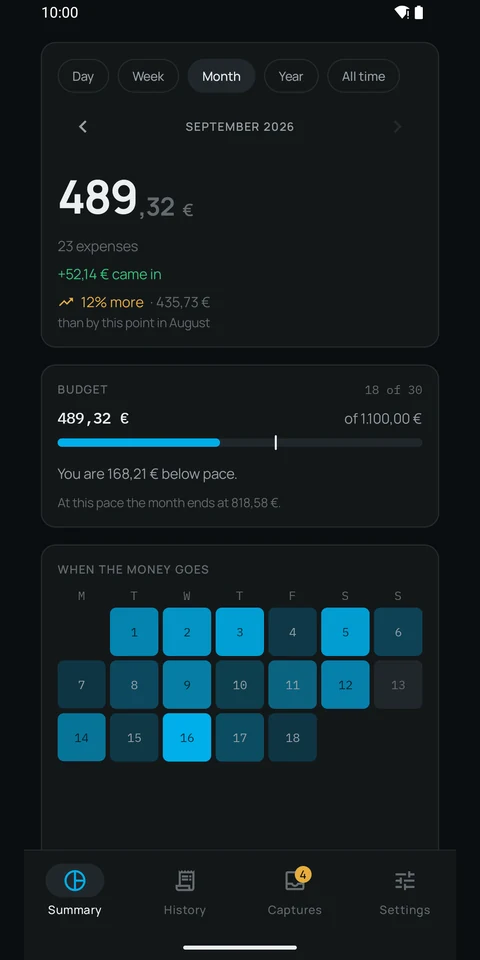
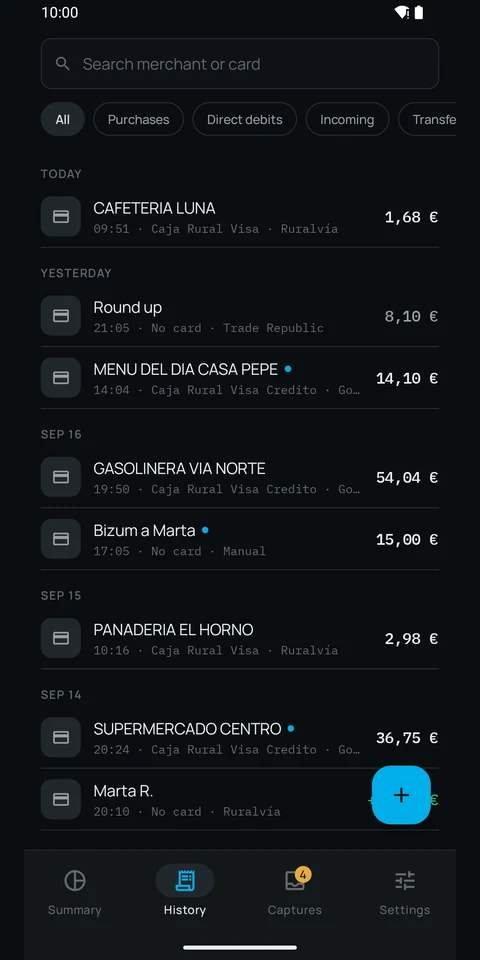
Monthly total, per-card breakdown compared against last month, and the full history with search. Nothing to type.

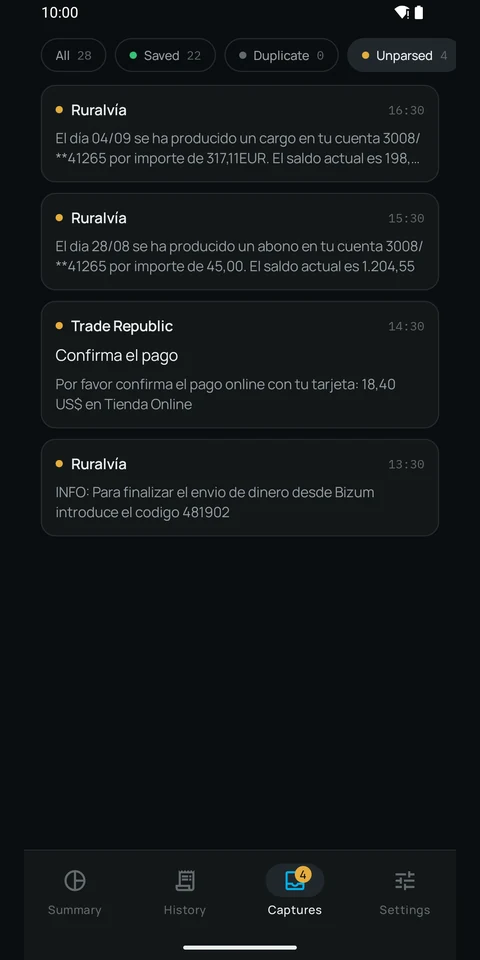
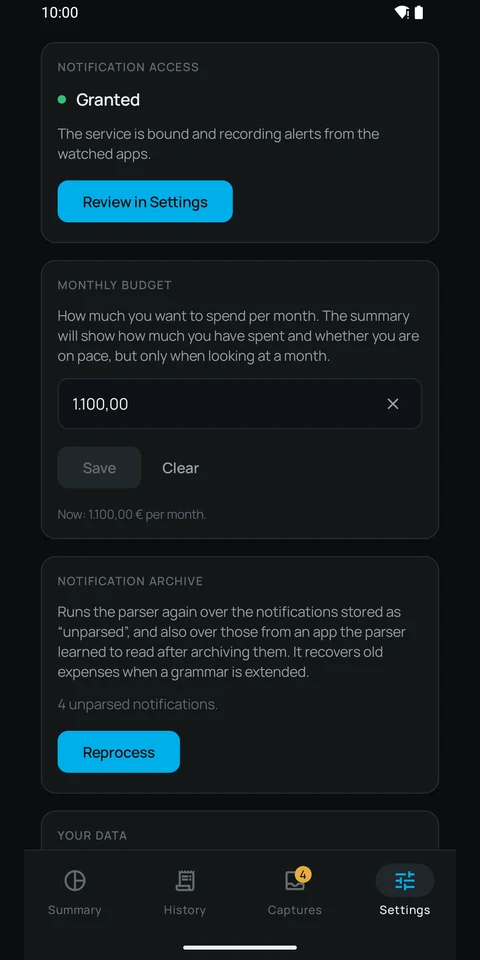
A walk through the app, no sound: wide screens get the tablet version and phones the handset one. Nothing downloads until you press play. The screens it shows are the same ones below, each described in full.

Xtracto’s Summary screen: the month total, 489,32 € across 23 expenses, the 52,14 € that came in, the budget bar with its pace marker and the heatmap of the days money went out. The History screen: movements grouped by day, with search and filters for purchases, direct debits, incoming and transfers, and on each line the merchant, the card and the app that sent the alert. The Captures screen: the archive of alerts received, showing the original text of the ones the parser does not understand yet. The Settings screen: notification access granted, the monthly budget and the archive reprocessing, which runs the parser again over whatever did not match.

The amounts and merchants in these screenshots are made up: they are taken on an emulator with test data, never from anyone’s phone.

Notification access, explained

This is the most sensitive permission the app asks for and it deserves an honest explanation. With it, Android lets Xtracto see the notifications that appear on your phone. Xtracto only looks at those from a closed catalogue of 216 finance applications. It reads and stores nothing from the rest: your messages, your email and your social networks are discarded untouched.

And that catalogue is the ceiling, not the list. Inside the app, under Settings, all 216 have a switch each and you decide which ones it listens to. Switching one off is not hiding it: the service does not even open its notifications. That is the difference between not showing a piece of data and not holding it.

And because the app cannot reach the internet, what it reads has nowhere to go. It stays on your phone, in a database only it can open.

If your bank is not supported

Xtracto currently understands the alert formats of a specific set of banks. If yours uses another one, the app will tell you: it stores the alert without interpreting it, and you can send us the format without sending us your data. Before anything is shared, the app replaces amounts, dates, merchants and numbers with placeholders and shows you exactly what will go out:

A direct debit of 41,52 EUR from FUNDACION EJEMPLO
has been charged to your account 1234/**56789

                        ↓

A direct debit of <amount> EUR from <merchant>
has been charged to your account <account>

The template alone is enough to add your bank, and sending is voluntary: the app takes you to the form with everything prepared, or you pick any other route from the system share sheet.

And the app is useful to you in the meantime: you can enter an expense by hand —the amount, who it went to and the date— for whatever no app announces, like a payment you sent to a friend. If the bank alert for that same payment arrives later, it replaces your entry instead of duplicating it.

See which banks it recognises Request my bank

Frequently asked questions

Does Xtracto connect to my bank?

No. It does not ask for your credentials, it does not use Open Banking, and it cannot read your real balance or move money. It only reads the alerts your bank already sends to your phone and turns them into transactions.

Does it need an internet connection?

No, and it cannot have one: the app declares no INTERNET permission. It works entirely offline, and even if it wanted to send your data to a server the operating system would stop it. That is not a promise, it is a technical limitation you can verify yourself on the installed file.

Is it safe to grant notification access?

It is the most sensitive permission the app asks for and it deserves an honest answer. With it, Android lets Xtracto see the notifications that arrive on your phone. Xtracto only looks at those from a closed catalogue of 216 finance applications, and within that catalogue you decide one by one which ones it listens to, under Settings. Switching one off is not hiding it: the service does not even open its notifications. It reads and stores nothing from the rest of the phone, so your messages, your email and your social networks are discarded untouched. And because the app cannot reach the internet, what it reads has nowhere to go. You can revoke the permission whenever you want from Android settings.

Where is my spending data stored?

On your phone, in a local database no other application can open. It is not uploaded to cloud backup, you can export it to CSV whenever you want, and uninstalling deletes it completely, because there is no copy anywhere else.

Which banks does it recognise?

A specific set of banks, which grows with the formats people send in. If yours is not there, the app will tell you: it stores the alert without interpreting it and you can send us the message template without sending us any of your data, because it replaces amounts, dates, merchants and numbers with placeholders first.

Can I enter an expense by hand?

Yes. There is a button to enter by hand whatever no app announces —a payment you sent to a friend, a cash purchase—: the amount, who it went to and the date. If the bank alert for that same amount arrives within the next three days, it replaces your entry instead of duplicating it. It is also how you keep track of your spending while your bank is not recognised yet.

Is there an iPhone version?

No, and for now there cannot be: iOS does not let an application read other apps’ notifications, which is exactly what Xtracto lives on. It is a limitation of the system, not a decision of ours.

When will it be available to download?

It is already on Google Play, but in closed testing: today only accounts enrolled as testers can install it. Before it can be published for everyone, Google requires 12 people to be in the test for 14 days in a row and to actually use it; as soon as that is done, it ships. If you want in, you can ask on the closed test page.

Availability

Xtracto is already on Google Play, but in closed testing: today only accounts enrolled as testers can install it. What is left before it can be published is not code, it is a Google requirement: 12 people in the test for 14 days in a row, and checked to be using it. That is what the date depends on. Once that is met, it will be available to everyone.

If you fancy lending a hand, that is where it counts most: ask to join the test.

And if what you are after is where the app is heading —what it already does, what is being worked on now and what we are never going to do— it is all in the roadmap and release notes.

In the meantime, the most useful thing you can do is tell us which bank you use. If it does not show up in the app, request it — the name is enough — and if it does show up but its alerts are not understood, send the format. Every one that arrives is one more bank recognised on release day.

Join the closed test Privacy policy

Xtracto is not a banking app. It does not connect to your bank, cannot read your real balance and cannot move money. It only reads the alerts your bank already sends you.